FAQ for macOS
Answers, how-to guidance and troubleshooting for Video Downloader Ultimate on macOS.
How to
How to start Video Downloader Ultimate (VDU)
- Because VDU is not a browser extension but a macOS app, it needs to be launched if you want to download videos. As with any other app, open the Launchpad and click the blue "Video Downloader Ultimate" icon.
- Video Downloader Ultimate needs Python3. Many Macs come with it installed by default. If you don't have it, the first scan will ask you if you want to install Python3. Please allow the installation.

Activate the software
- After installation, VDU is in trial mode, i.e. downloading videos is blocked. With your activation code, which you received by e-mail, you can unlock your version. To do this, click the "Enter activation code" button in the dialog. If this button doesn't exist, your version is already activated.
- A dialog opens. Enter your activation code and the e-mail address where the code was sent. Then press "Activate Now". The red text disappears and VDU is activated.

The main dialog
- When you start VDU, the main dialog appears. At the top you can switch between 4 pages
- Search Videos Here is everything you need to search for videos on a website and then download them.
- Progress If videos are currently downloading, you can see the progress here.
- Downloaded Completely downloaded videos are listed here.
- Settings Here you can make settings, e.g. change the language or select a player to play the downloaded videos.
Search and download videos
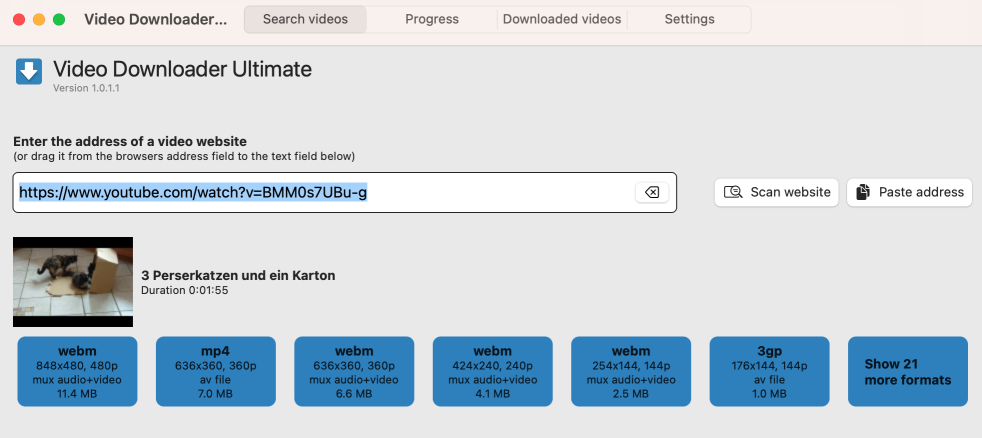
- The search downloads a webpage and scans it for downloadable videos. Most of the videos are in different resolutions, formats or languages. A download button is displayed for each in the result list.
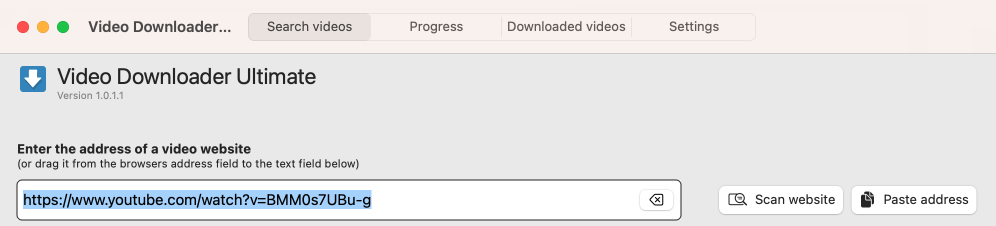
- Open your video page in the browser. Highlight the whole address of the video and drag it to Video Downloader Ultimate's address box. Alternatively, highlight the whole address and copy it, e.g. by pressing [CMD]+C. Then click "Paste address". When the correct address is in the address field, click "Scan website". It takes a few seconds and then the search results appear:
- Click the download button with the desired format and then enter a file name. The download starts. There are videos where video and audio are downloaded separately. The two files are then automatically combined into one file after the download. If you download a format with the text "Video only" or "Audio only", then the target file will contain only audio or only video.
How to download playlists from YouTube
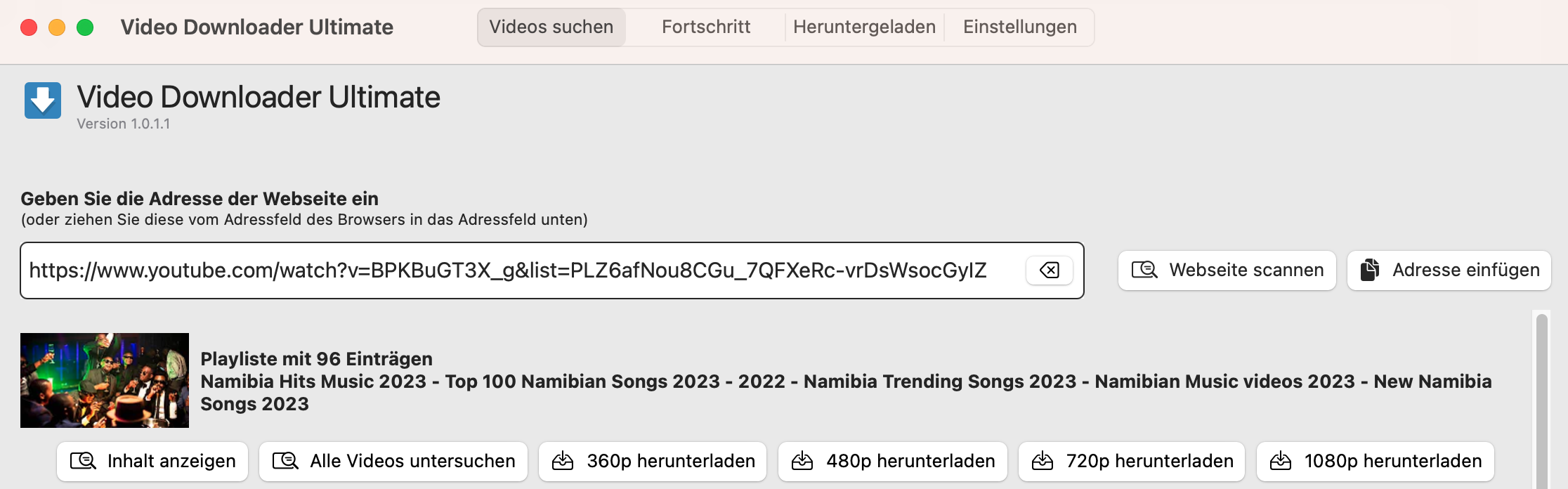
In your browser, play a YouTube video that is part of a playlist. As with a single video, enter the address in Video Downloader Ultimate's address field and click "Scan website".
General Questions
Where can I download the Video Downloader Ultimate installer ?
If you already have an activation code, you can download the installer .
Is there a free trial version ?
Yes, you can download a free trial version of Video Downloader Ultimate here .
Why should I buy the Pro version or Premium version of your product?
You can install the Pro version on up 3 PCs ( Premium version on up to 6 PCs) and these versions of Video Downloader Ultimate have some unique features not available in the Standard version. Please check out the comparison chart on the purchase page .
Where can I download videos ?
As long as the website uses the HTTP protocol, usually you can download videos from there. Unfortunately, it happens that websites use special mechanisms to prevent that. The following pages are recommended by us: • youtube.com • dailymotion.com • screen.yahoo.com • vimeo.com • ardmediathek.de • zdf.de/ZDFmediathek Of course, you can download videos from adult sites e.g. • xHamster • xVideos • Youjizz and other popular adult sites
Can I download paid videos?
Provider of paid videos ( e.g. Netflix, Prime video) most likely protect their videos e.g. by encryption. These videos cannot be downloaded. The only way to save them to your hard disc is to capture them while they are playing in the browser. To do this you need a capture software like Video Capture Ultimate which is also contained in the premium version of Video Downloader Ultimate.
Is it legal to download YouTube videos or any other online video?
If while browsing YouTube you find a video that you want to download in order to e.g., watch it again offline later or to enhance your video collection on your PC, we ask you to read first YouTube’s Terms of Service . Please also bear in mind that downloading copyrighted YouTube or any other copyrighted videos might not be legal if you didn’t get the permission from the content owner. So please always make sure that the video you would like to download belongs to the public domain, or that the copyright owner has given the permission to download the work.
Why use this application instead of a browser Add-On?
When Video Downloader Ultimate runs as a Windows application, it is able to detect videos loaded from any browser running on the system. It can use advanced techniques to detect video streams, that are split into multiple files e.g. DASH format and merge them while downloading. In addition we are able to convert downloaded content to a different output format • Support split video files • Support DASH format • Convert to MP3 and MP4 • Enable youtube download with browsers that do not allow this within Add-Ons
Can I upgrade to a 5-user License once bought a single license?
Yes, in this case you can buy an upgrade to the Pro or Premium oversion. In addition to the additional functions, you also get 3 or 6 licenses at once.
Where can I download Video Downloader Ultimate for Chrome?
Video Downloader Ultimate is a windows program for all browsers. If you mean a Chrome web extension this is called Video Downloader Professional and can be downloaded from the Chrome web store.
Troubleshooting
I keep getting the error "Your connection is not private" in Google Chrome.
As of the end of October 2022, Chrome will no longer use the certificates that are installed on Windows by default, but will only use its own. This leads to the above error message if automatic search is activated in Video Downloader Ultimate. The following solutions are possible: • Switch off the automatic search in Video Downloader Ultimate and use the manual search or the integrated browser to download videos (from Video Downloader Ultimate Version 1.0.1.196). • Or continue to use the Windows certificates in Chrome: • Start Chrome as follows: Press [Win]+[R] and then enter this line: chrome --disable-features=ChromeRootStoreUsed • Alternatively, advanced users can make the following entry in the registry so that Chrome always uses the Windows certificates: [HKEY_CURRENT_USER\Software\Policies\Google\Chrome] "ChromeRootStoreEnabled"=dword:00000000 • Or ask our support for more help
In Google Chrome on Windows 7there's an error message "Your connection is not fully secure" or "NET::ERR_SSL_OBSOLETE_VERSION" or "The server should enable TLS 1.2 or later."
The problem is, that TLS 1.2 which is forced by the latest Chrome is disabled in Windows 7 by default and VideoDownloaderUltimate is using Windows functions to communicate withthe browser. If TLS 1.2 is not enabledChrome shows this error message. To solve this problem 2 steps are necessary: 1) Make sure Windows 7 has the update KB3140245. You can verify and force it in Windows control panel or you could start this update manually by downloading it from this Microsoft site: https://www.catalog.update.microsoft.com/search.aspx?q=kb3140245 2) 2 registry entries are needed: Windows Registry Editor Version 5.00 [HKEY_LOCAL_MACHINE\SOFTWARE\Microsoft\Windows\CurrentVersion\Internet Settings\WinHttp] "DefaultSecureProtocols"=dword:00000800 [HKEY_LOCAL_MACHINE\SYSTEM\CurrentControlSet\Control\SecurityProviders\SCHANNEL\Protocols\TLS 1.2\Server] "DisabledByDefault"=dword:0 "Enabled"=dword:1 If you are familiar with regedit.exe you could add them manually, or you can download and start this small reg file which will add these keys into the registry. After adding these keys reboot your system and the problem is solved.
A red bar appears in the browser that says I should start videodownloaderultimate.exe.
This happens for instance on thesite containing the downloaded videos if the site cannot connect to VideoDownloaderUltimate. Causes may be the following: • videodownloaderultimate.exe is ended or crashed. Try this: • Restart videodownloaderultimate.exe. • An ad-blocker installed in the browser prevents the connection between the website and videodownloaderultimate.exe. Try this: • Deactivate the ad-blocker in your browser. • Use Video Downloader Ultimate with another browser, where no ad-blocker is installed, e.g. Edge or InternetExplorer • Create an exception rule in the ad-blocker settings for videodownloaderultimate.com. • A anti virus software installed on your system prevents the connection between the website and videodownloaderultimate.exe. Try this: • Create an exception rule in your anti-virus program for videodownloaderultimate.exe • The portnumber of videodownloaderultimate has been changed after a restart. Try this: • Close the site containing the downloaded videos and reopen it by the menu of videodownloaderultimate.exe
Playback of downloaded videos does not work.
Please note, that some videos may be of a format not supported by the application you use for playback. In such case you can download a tool like VLC mediaplayer to check and playback your downloaded videos.
Why Video Downloader Ultimate does not work under Windows XP?
Microsoft has discontinued the support for Windows XP, which means that innovations on web pages are no longer supported. Specifically, from sites using the https protocol with new certificates, e.g. Youtube, you cannot download videos under Windows XP.
Playback of downloaded videos in Apple Safari does not work.
After installing apple quicktime on your machine most videos should play fine in Safari. Please note, that some videos may be of a format not supported by quicktime. In such case you can use a tool like VLC mediaplayer to check and playback your downloaded videos.
"Maximum number of activations reached" message when entering the license key.
This happens when the key was already used on another PC. Please contact our support.
I have lost my internet connection.
VDU is installed as proxy to find the watched video URLs. Theoretically, it is conceivable that this caused the lost of the internet access. If this happens, simply start videodownloaderultimate.exe again. If that does not help, you can disable the proxy manually as follows: - Start Internet Explorer (even if you otherwise use a different browser) - Enter the menu Tools->Internet Options - Click Connections - Click on Lan settings - Disable the checkbox under proxy server
After downloading a video, my system is unbearably slow.
Maybe you have downloaded a defective or incompatible video. When Windows tries to create a thumbnail, it happens that the memory usage of the corresponding process continues growing up caused by an error in Windows. Then proceed as follows: - Start the Task Manager (right click on an empty area of the taskbar) - Stop the process dllhost.exe - Delete the last downloaded video
System requirements?
System requirements?
VDU works with Windows 10, Windows 11 and newer and with macOS Big Sur (11) and newer
System requirements?
We recommend a fast internet connection to download the videos
Still need help?
If your question is still open, please use the contact form and we will help you directly.
Open contact form